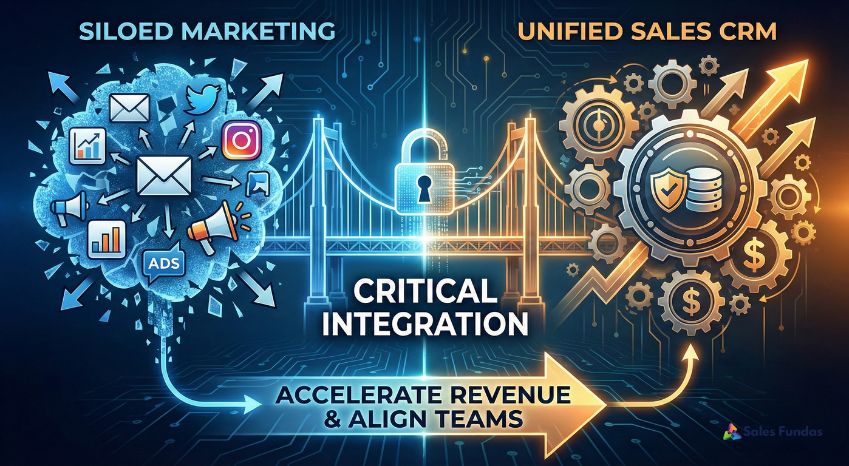
It is a tale as old as business itself: The War Between Sales and Marketing.
Marketing says, “We sent you 500 leads this month! Why aren’t you closing them?”
Sales replies, “Because 490 of them were students doing research or competitors spying on us. Where are the real buyers?”
This friction creates a “Blame Gap” that destroys morale. But more importantly, it creates a “Data Gap” that destroys revenue. When your marketing platforms (email automation, ad accounts, website forms) don’t talk to your Sales CRM, you are essentially flying a plane with one eye closed.
In the modern business landscape, data silos are the enemy of scale. If you are a technical founder or business leader, you know that disjointed systems lead to inefficiency. The solution is not more meetings; the solution is systemic alignment.
This article explores why integrating your Marketing tools with Sales CRM is not just an IT task—it is a critical revenue strategy that defines the difference between stagnant growth and a scalable sales engine.
The High Cost of the “Data Black Hole”
Before we look at the solution, we must understand the cost of the problem. When a potential client interacts with your brand—downloading a whitepaper, clicking a LinkedIn ad, or attending a webinar—that data usually sits in a marketing silo (like Mailchimp, HubSpot Marketing Hub, or Google Ads).
Meanwhile, your sales team lives in the CRM (Salesforce, Pipedrive, Zoho).
If those two systems are disconnected, your sales team has no idea that their hottest prospect just visited the “Pricing” page three times yesterday. They make a cold call instead of a contextual warm call.
The consequences of this disconnect are measurable and painful:
- Lead Leakage: Hot leads cool down because manual data entry takes too long.
- Poor Customer Experience: Prospects get asked the same questions twice (once by a form, once by a rep).
- Zero ROI Visibility: You cannot calculate Customer Acquisition Cost (CAC) accurately if you don’t know which specific marketing campaign generated the closed deal.
Integrating your Marketing tools with Sales CRM bridges this gap, turning isolated data points into a coherent narrative about the customer journey.
1. Achieving the “360-Degree” Customer View
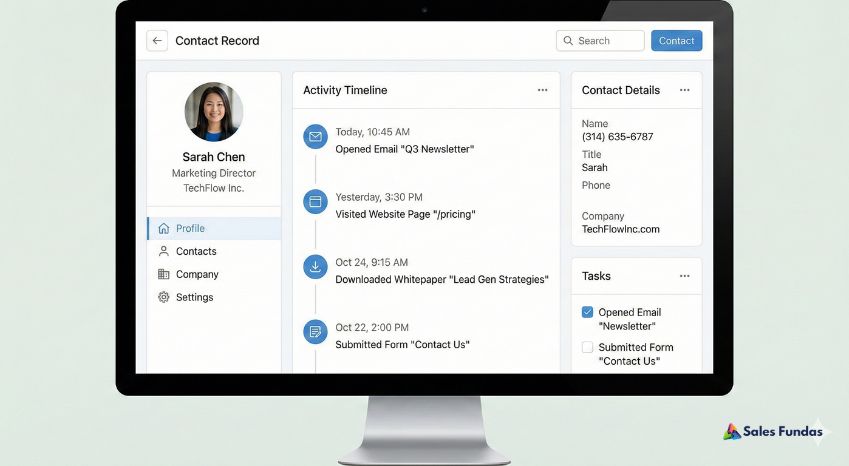
Imagine a sales rep opening a contact record and seeing not just the phone number, but a timeline of every digital interaction that prospect has had with your company.
- Day 1: Viewed “Ultimate Guide to Sales Process” blog.
- Day 3: Opened “Welcome” email.
- Day 7: Visited “Pricing” page.
- Day 8: Filled out “Contact Us” form.
This is the power of integration. It gives your sales team context. Instead of asking, “So, what are you looking for?”, the rep can say, “I saw you were reading our guide on Sales Process engineering—how is your team currently handling that?”
Jayant Kelkar, founder of Sales Fundas, emphasizes that sales is an engineering problem. You need data to solve it. When you have a 360-degree view, you move from “guessing” to “consulting.”
2. Speed to Lead: The 5-Minute Rule
The most critical factor in converting a web lead is response time. According to Harvard Business Review, companies that try to contact potential customers within an hour of receiving a query are nearly 7 times more likely to have a meaningful conversation with a key decision-maker than those who try to contact even an hour later.
If you rely on manual exports (downloading a CSV from Facebook Ads and uploading it to CRM), you have already lost. That process takes hours, sometimes days.
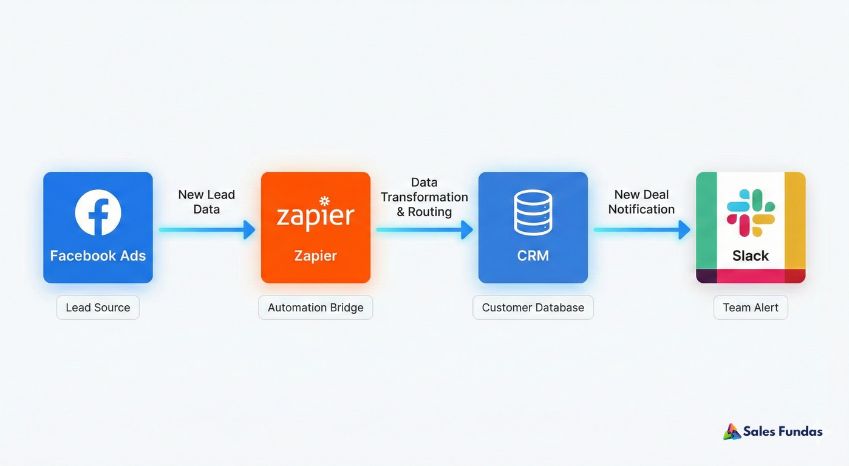
By integrating your Marketing tools with Sales CRM, a lead generated from a Facebook Lead Form or a website pop-up appears in your CRM instantly.
The Workflow:
- Prospect fills form.
- Integration creates CRM deal instantly.
- CRM assigns the lead to a rep.
- Rep gets a notification on their phone.
- Total Time: < 30 seconds.
3. Automated Lead Scoring: Separating the Wheat from the Chaff
Not all leads are created equal. A student downloading a PDF is not the same as a CEO requesting a demo. However, without integration, your sales team treats them the same.
Integration allows you to implement Lead Scoring. This system assigns point values to marketing behaviors, which are then synced to the CRM.
- Opens email: +1 point
- Clicks link: +3 points
- Visits “Careers” page: -10 points (likely a job seeker)
- Visits “Pricing” page: +20 points
When a prospect crosses a certain threshold (e.g., 50 points), the CRM can automatically flag them as a “Marketing Qualified Lead” (MQL) and alert the sales team. This ensures your high-value closers are only talking to high-intent buyers.
How to Setup CRM for the first time
4. Closed-Loop Reporting: Proving Marketing ROI
This is the “Holy Grail” for business owners.
Usually, marketing reports on “Clicks” and “Leads.” Sales reports on “Revenue.” But how do you connect them?
Integrating your Marketing tools with Sales CRM creates a feedback loop. When a salesperson marks a deal as “Closed Won” in the CRM, that data is pushed back to the marketing software.
Now, you can answer the million-dollar questions:
- “Did the LinkedIn Ads campaign actually generate revenue, or just noise?”
- “Which blog post brought in the highest Life Time Value (LTV) customers?”
This moves marketing from a “cost center” to a “revenue generator.” It allows you to cut budget on campaigns that generate empty leads and double down on campaigns that generate cash.
5. Nurturing the “Not Yet” Leads
Statistically, 50% of your leads are qualified but not ready to buy right now. If a salesperson calls them and gets a “call me in 6 months,” what happens?
In a disconnected system, that lead dies in the CRM graveyard.
In an integrated system, the salesperson changes the status to “Nurture.” This trigger tells the marketing software to add the prospect to a “Long-Term Nurture” email sequence. They receive helpful content once a month automatically. Six months later, when they click a link in an email, the CRM alerts the salesperson that the lead is active again.
This is how Sales Fundas helps clients build “Perpetual Sales Engines” that ensure no opportunity slips through the cracks.
How to Execute the Integration: Native vs. Middleware
You are sold on the why. Now, let’s look at the how. There are generally two ways to achieve integrating your Marketing tools with Sales CRM.
Option A: Native Integrations
Most modern SaaS tools have built-in connectors.
- Example: HubSpot Marketing Hub connects natively to Salesforce. Mailchimp has a native plugin for Pipedrive.
- Pros: Easy to set up, reliable, usually free.
- Cons: Limited customization. You can only sync the fields they allow.
Option B: Middleware (iPaaS)
Tools like Zapier, Make (formerly Integromat), or Tray.io act as the “glue” between systems that don’t talk natively.
- Example: When a Typeform is submitted, use Zapier to find the contact in CRM, update their status, and create a Slack notification.
- Pros: Infinite customization. You can build complex “If/Then” logic.
- Cons: Can get expensive at scale; requires “systems thinking” to maintain.
| Feature | Native Integration | Middleware (Zapier/Make) |
| Setup Difficulty | Low (Plug & Play) | Medium (Logic required) |
| Cost | Usually Included | Monthly Subscription |
| Flexibility | Low | High |
| Maintenance | Low | Medium |
Common Pitfalls to Avoid
As with any engineering project, things can go wrong. Here are the traps to avoid when you start connecting pipes:
- Dirty Data Syncing: If you have duplicates in your marketing list, you will push duplicates into your CRM. Clean your data before you integrate.
- Over-Alerting: Do not notify sales reps for every email open. They will turn off notifications. Only notify for high-intent actions (pricing page visits, demo requests).
- One-Way Streets: Ensure the data flows both ways. Marketing needs to know when a deal closes just as much as Sales needs to know when a lead opens an email.
Conclusion: Alignment is a Culture, Integration is the Tool
Ultimately, integrating your Marketing tools with Sales CRM is about more than API keys and field mapping. It is about aligning your entire organization around a single source of truth. It forces Marketing and Sales to agree on definitions, goals, and processes.
In the world of Business Consulting, we often see companies buy expensive software hoping it will fix their process issues. It won’t. The process must come first.
Sales Fundas specializes in this intersection of Process, People, and Technology. We don’t just teach your team how to sell; we help you architect the systems that make selling easier, faster, and more scientific.
Is your data stuck in silos?
Stop guessing where your revenue is coming from. Book a Strategy Session with Jayant Kelkar to design a fully integrated sales and marketing ecosystem that works for your business.
Frequently Asked Questions (FAQs)
1. What is the main benefit of integrating marketing tools with a CRM?
The primary benefit is data alignment. It provides a single view of the customer journey, allowing sales teams to have contextual conversations and marketing teams to measure the true ROI of their campaigns based on revenue, not just clicks.
2. Which marketing tools should I integrate first?
Start with your Lead Generation sources (Website forms, Facebook Lead Ads, LinkedIn Ads) to ensure instant lead capture. Next, integrate your Email Marketing platform (Mailchimp, ActiveCampaign) to sync engagement data like email opens and clicks.
3. Do I need a developer to integrate my CRM?
Not necessarily. Most modern tools (HubSpot, Pipedrive, Zoho) offer “no-code” native integrations or can be connected using drag-and-drop tools like Zapier. However, complex enterprise setups may require a technical specialist.
4. What data should I sync between marketing and sales?
At a minimum, sync:
- Contact details (Name, Email, Phone).
- Lead Source (e.g., “Organic Search,” “LinkedIn Ad”).
- Activity history (Web pages visited, emails opened).
- Lifecycle Stage (e.g., “Subscriber,” “MQL,” “Customer”).
5. How much does integration cost?
Native integrations are often free with your software subscription. Middleware tools like Zapier offer free tiers but can cost $20-$100/month for businesses with moderate volume. The biggest cost is the time invested in setup and maintenance.
6. What is the difference between CRM and Marketing Automation?
CRM (Customer Relationship Management) is for the Sales team to manage 1-on-1 relationships and deals. Marketing Automation is for the Marketing team to manage 1-to-Many communications (bulk emails, ads). Integration connects the two.
7. Can integration help with lead quality?
Yes. By using “Lead Scoring” (assigning points for marketing actions), you can filter out low-quality leads and ensure your sales team only focuses on prospects who are engaged and ready to buy.
8. What happens if I have duplicate contacts?
Duplicates are a common issue. Most CRMs have de-duplication tools that merge records based on email addresses. It is critical to run a data cleanup before turning on any automated sync.
9. How does this help with reporting?
It creates “Closed-Loop Reporting.” When a deal closes in the CRM, that value is attributed back to the original marketing source. This tells you exactly how much revenue each marketing dollar generated.
10. Is this relevant for small businesses?
Absolutely. In fact, it is more critical for small businesses because you have fewer resources. Automating data entry and lead routing saves precious time, allowing a small team to handle a larger volume of leads efficiently.