If you are an Indian startup looking to professionalize your sales without burning cash, Zoho CRM (for local support and customizability) and HubSpot (for ease of use) remain the top contenders. However, the “best” tool depends entirely on your specific sales channel: choose HubSpot if you sell via email/inbound marketing, but look at Zoho or Bitrix24 if your team relies heavily on field sales and WhatsApp.
Warning: At Sales Fundas, we have audited hundreds of startups. The #1 reason CRM implementations fail is not the software choice—it is the lack of a defined sales process before the software is installed. This guide covers both the tools and the strategy to make them work.
The “Free” Trap: What Startups Need to Know Before Signing Up
Before we list the software, we must address the “hidden costs” that often trap Indian founders. A “Free Forever” plan is often a marketing hook designed to force an expensive upgrade 6 months down the line.
1. The “User Limit” Cliff
Many tools allow unlimited contacts but cap you at 2 users. If you plan to hire 3 interns next month, that “free” CRM might suddenly cost you ₹4,000/month per user.
2. The WhatsApp Gap
In India, deals close on WhatsApp. Most global free CRMs (like HubSpot Free) do not offer native WhatsApp integration. You end up with a fragmented system where data lives on your rep’s phone, not in your company database.
3. Data Residency (DPDP Act)
With India’s new Digital Personal Data Protection (DPDP) Act, hosting customer data on servers outside India can add compliance friction. Startups should prioritize platforms with Indian data centers.
Guide to Setting Up a Sales CRM for the First Time
Top 5 Free CRM Solutions Suitable for Startups in India
We have evaluated these tools based on Utility for Indian SMEs, Mobile App Quality, and Upgrade Affordability in INR.
1. HubSpot CRM (The “Apple” of CRMs)
Best For: B2B Service Startups, Agencies, and Inbound Marketing teams.
HubSpot is arguably the most intuitive CRM on the market. Its user interface (UI) is beautiful, and it requires almost zero training.
- The Good:
- Unlimited Users: You can add your entire team on the free plan (a rare feature).
- Email Tracking: Know exactly when a prospect opens your proposal.
- Gmail/Outlook Integration: Seamless logging of emails.
- The Bad:
- Reporting Limits: The free reports are very basic. You won’t get detailed funnel analytics.
- WhatsApp: No native integration on the free plan.
- The Price Jump: The moment you need paid features (like automation), the price jumps significantly (often in USD).
Jayant Kelkar’s Verdict: “Use HubSpot if your team sits in an office and sells primarily via email and Zoom. It is less effective for field sales teams.”
2. Zoho CRM (The “Made for India” Powerhouse)
Best For: Field Sales Teams, Manufacturing, and Cost-Conscious Startups.
Zoho is the giant of the Indian SaaS ecosystem. It is robust, highly customizable, and priced in INR.
- The Good:
- Field Sales Ready: The mobile app allows check-ins, geolocation tracking, and voice notes—perfect for reps on the ground in Mumbai or Delhi.
- Automation: Even the free/lower-tier plans offer some workflow automation.
- Ecosystem: Connects easily with Zoho Books (for GST invoicing) and Zoho Campaigns.
- The Bad:
- UI Complexity: It has a steeper learning curve than HubSpot. It can feel “cluttered.”
- Free Limits: The free edition is capped at 3 users.
3. Freshsales (The Balanced Choice)
Best For: Startups needing a built-in phone dialer/chat.
Another Indian success story (Freshworks), Freshsales offers a modern, clean interface that sits between HubSpot’s simplicity and Zoho’s power.
- The Good:
- Built-in Dialer: Great for telesales teams making 50+ calls a day.
- Activity Timeline: Visually shows exactly how a lead has interacted with your website.
- The Bad:
- The “Growth” Cap: Like Zoho, the free tier is limited to 3 users.
4. Bitrix24 (The “Kitchen Sink” Option)
Best For: Tech-savvy startups wanting Project Management + CRM in one.
Bitrix24 is not just a CRM; it is a full business suite.
- The Good:
- Unlimited Users: Truly unlimited.
- Features Galore: Includes tasks, website builder, and internal chat.
- The Bad:
- Overwhelming: It is very easy to get lost. We often see teams abandon it because it is too complex for a simple sales process.
5. Privyr (The “Mobile-First” WhatsApp CRM)
Best For: Solopreneurs, Real Estate Agents, and WhatsApp-heavy sellers.
While not a traditional “Database” CRM, Privyr deserves a mention for the Indian market. It connects directly to Facebook Lead Ads and WhatsApp.
- The Good:
- WhatsApp Speed: One-click response to leads via WhatsApp.
- The Bad:
- Not for Teams: It is designed for individuals, not for managing a 10-person sales team.
The Sales Fundas Methodology: Setup Before Software
In our consulting experience at Sales Fundas, we see companies switch CRMs every year, blaming the tool. The problem is rarely the tool.
A CRM is a multiplier. If your process is zero, the CRM multiplies it by zero.
The “Pre-Installation” Checklist
Before you import your contacts, define these three elements:
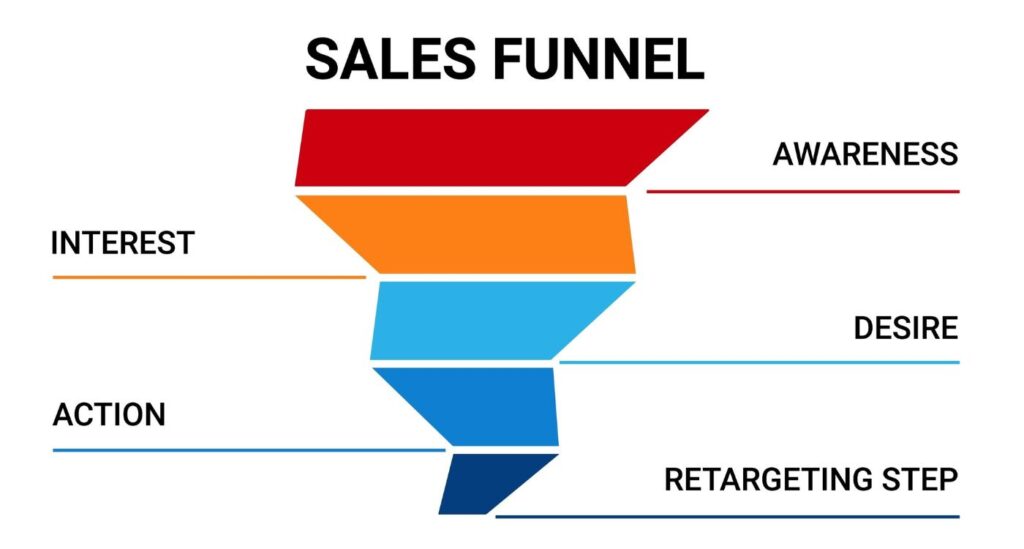
- Lead Stages: Don’t use the default US-centric stages. Adapt them.
- Default: “Qualified” -> “Proposal”
- Indian Reality: “Lead In” -> “Contact Established” -> “Requirement Understood” -> “Proposal Sent” -> “Negotiation” -> “Closed Won”.
- Disqualification Criteria: When do you delete a lead? (e.g., “No budget,” “Ghosted for 3 weeks”). A clean database is better than a big database.
- The “Data Entry” Tax: You must enforce a rule: “If it’s not in the CRM, it didn’t happen.” This is a culture issue, not a tech issue.
Technical Guide: Implementing Your Free CRM
Here is a quick roadmap to getting your first 100 leads live:
- Clean Your Data (Excel/CSV): Ensure your First Name, Last Name, and Phone Number columns are separate. Add a column for “Lead Source” (e.g., Referral, Cold Call).
- Configure Custom Fields: Most CRMs lack Indian-specific fields. Add fields for “GST Number,” “City/State,” and “Next Follow-up Date.”
- Connect the Intake: Use the CRM’s form builder to replace the “Contact Us” form on your website. This ensures leads drop directly into the system, eliminating manual entry.
Frequently Asked Questions (FAQ)
Q: Can I really run a business on a free CRM forever? A: No. Eventually, you will need automation or advanced reporting. Treat the free tier as a 12-18 month runway to build revenue that pays for the upgrade.
Q: Which CRM is best for Indian Real Estate startups? A: Privyr or Zoho CRM are best because they prioritize mobile usage and WhatsApp integration, which are critical for real estate.
Q: Do free CRMs offer customer support? A: Rarely. You will mostly rely on community forums and YouTube tutorials. If you need 24/7 phone support, you must pay.
Q: Is Excel a valid alternative to a CRM? A: Only for the first 50 leads. After that, Excel fails at “reminders” and “history tracking.” You cannot see what your sales rep discussed with a client 3 months ago in Excel.
Q: How do I get my team to actually use the CRM? A: This requires training and management will. Tie sales incentives (commissions) to CRM accuracy. If the deal isn’t updated in the CRM, the commission isn’t paid.
Q: Does HubSpot Free work well in India? A: Yes, for B2B services. However, the lack of native WhatsApp integration is a major friction point for B2C or high-volume sales.
Q: Are these CRMs compliant with Indian data laws? A: Zoho and Freshsales have data centers in India. HubSpot and others are GDPR compliant, which generally aligns with high standards, but check specific data residency options.
Q: What is the biggest mistake startups make with CRMs? A: Over-customization. They spend months trying to make the CRM perfect instead of just calling customers. Keep it simple.
Conclusion: The Tool Is Just the Engine
Choosing between HubSpot, Zoho, or Freshsales is important, but it is secondary to how you drive the car.
A free CRM can transform your Indian startup from “chaotic” to “scalable”—but only if it is powered by the right sales habits.
At Sales Fundas, we don’t just recommend software; we build the sales architecture that makes the software work. From defining your sales stages to training your team on negotiation, we bridge the gap between “installing” a tool and “generating” revenue.
Is your sales team struggling to adopt a CRM? Book a Free 30-Minute Sales Process Audit with Jayant Kelkar